
Spoly: Sports Card Scanner
Scaling Engine LimitedLifestyle
4.882.00 Reviews
- Version
- 1.2.1
- Installs
- 10.00K
- Age Rating
- Everyone
Screenshots
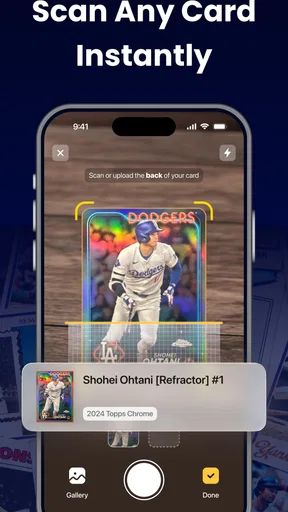
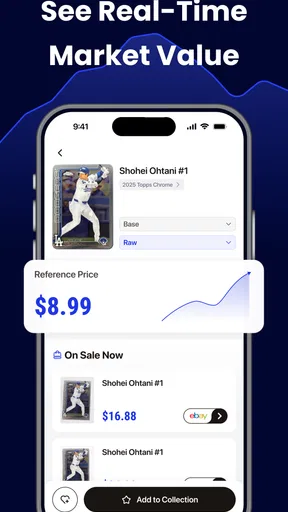
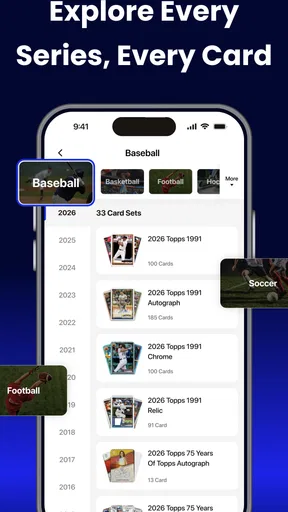
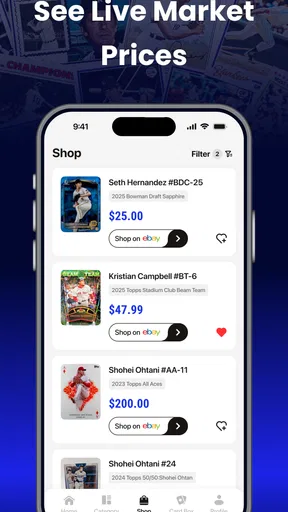
Our Review of Spoly: Sports Card Scanner
 Analysis by Appyee
Spoly: Sports Card Scanner is the kind of lifestyle app I would reach for when a sports card collection starts becoming difficult to track by memory alone. Its focus is practical: helping identify cards, estimate their value, and organize a personal collection from one place. I found that combination more useful than treating a scanner as a novelty, because the real benefit appears after the first scan, when you want to remember what you own, compare possibilities, or decide which cards deserve closer attention.
The app is free to install, carries an Everyone age rating, and is made by Scaling Engine Limited. It has an average rating of 4.8 from around 1.2K ratings, which suggests that the overall experience has landed well with its early audience. That is encouraging, but I would still treat a card valuation as a starting point rather than a guaranteed selling price. Collectibles change with condition, demand, grading, timing, and marketplace context, so the app is most helpful when it supports a decision rather than making the decision for you.
What Spoly is really useful for in a collection
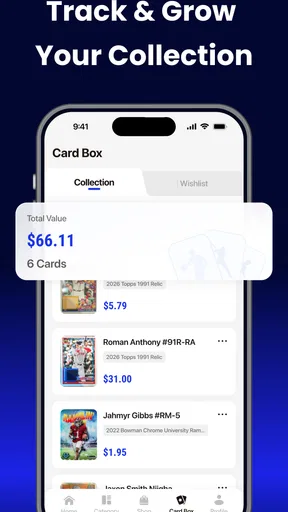
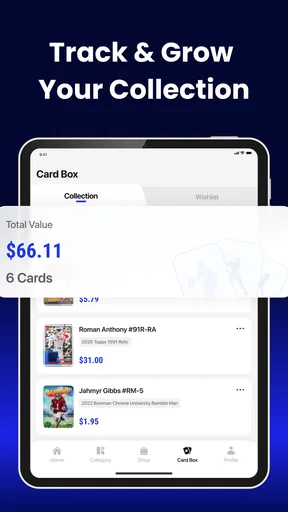
The strongest idea here is the connection between recognition, valuation, and organization. Many card apps handle one of those jobs reasonably well, but the workflow becomes less convenient when identification happens in one place, notes in another, and price checking somewhere else. Spoly: Sports Card Scanner is designed around keeping those steps together, which makes it better suited to an active collection than to a single curiosity scan.
I can imagine using it after opening a box of cards, sorting a family collection, or reviewing cards that have been stored for years. Instead of trying to remember every set and player, I would use the scanner to create an initial record, then look at the valuation information and decide whether that card belongs in a keep, sell, trade, or investigate-later group. That last category matters. A quick identification is not the same as a final judgment, especially when condition or edition details can change the result.
The collection manager also changes how I think about the app. A scanner is easy to try once and forget, while a collection tool can become part of a repeatable habit. If I scan cards as I sort them, I can gradually build a clearer picture of what I own. That is more valuable than chasing a single exciting estimate, because it helps reveal duplicates, overlooked cards, and gaps in a collection.
Why the three-part workflow matters
Identification, valuation, and collection management should not be treated as identical tasks. Identification answers, “What might this be?” Valuation asks, “What could it be worth in the current context?” Collection management answers, “What should I do with it and how will I find it later?” Spoly brings these questions into one experience, but I would still slow down between each stage.
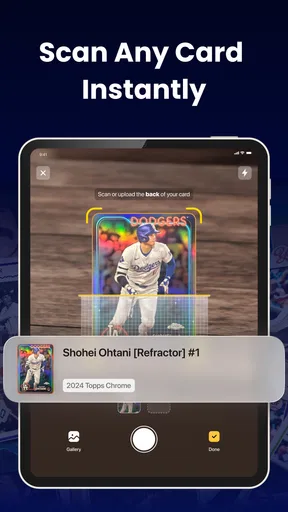
A useful habit is to scan first, inspect the result second, and organize third. If I immediately accept every result without checking the card itself, an incorrect match can quietly enter the collection. I would compare the visible details on the physical card with the identified entry, particularly the player, team, year, set, and any distinguishing marks. Even without turning the process into a formal appraisal, that pause makes the collection more dependable.
Another practical tip is to use the app while cards are physically grouped in a meaningful way. Sorting by player, set, sport, or storage box before scanning makes later organization easier than scanning randomly from several piles. This is a small workflow choice, but it prevents the collection manager from becoming an unstructured digital drawer.
How I would use it on an ordinary afternoon
Imagine finding a box of cards while cleaning a closet. I would separate damaged cards from cleaner ones, put aside anything that looks unusual, and scan the ordinary-looking cards in batches. When the app identifies a card, I would record it in the collection rather than immediately assuming the displayed value is what I could receive from a buyer.
For cards that appear more interesting, I would take a second look at condition and details before making any decision. A bent corner, surface scratch, centering issue, or unclear variation can matter more than a broad identification. I would then use the collection record to mark those cards for further research. This workflow keeps Spoly in the role where it is most trustworthy: a fast organizer and research aid, not a substitute for specialist inspection.
If I were helping a relative sort cards, the Everyone rating would also make the app approachable for a broad household audience. That does not remove the need for adult judgment around purchases or sharing personal information, but it does make the basic concept easy to introduce to younger collectors and beginners.
Trust, controls, and moments that deserve attention
For an app that may be used around a valuable collection, trust is not only about recognition accuracy. I also want to know what choices are visible, how account controls work, and what happens when an app asks me to move from a free experience toward paid features. Spoly is free to install, but in-app purchases are listed from $29.99 to $39.99 per item. That price range makes it especially important to pause before confirming anything.
I would not treat the free installation as proof that every useful part of the experience remains free. Instead, I would look carefully at the screen that introduces a paid option, check whether the purchase is one-time or recurring, and confirm exactly what it unlocks before proceeding. The most useful user control here is simple: do not enter a payment flow just because a valuation or collection action feels urgent.
The current version is 1.2.1, and the app requires Android 8.0 or later. That makes device compatibility a practical first check before spending time organizing a collection. On an older phone, I would also pay attention to camera behavior, scan responsiveness, and how comfortable the screen is for reviewing small card details. A scanner can be technically available on a device while still being awkward to use if the camera or display makes inspection difficult.
Permissions and data-sensitive moments
The most sensitive moment in an app like this is naturally the scan itself. A card image can reveal more than a player name: it may show handwritten notes, storage labels, collection identifiers, or other objects accidentally included in the frame. I would keep the card isolated in the camera view and avoid capturing background material that has nothing to do with identification.
I would also review the permission prompt before granting camera access and make sure the request matches the action I am trying to perform. If I am only organizing existing records, I would not expect to need the camera at that moment. That distinction gives me more control over when the app can interact with the device camera, rather than leaving access enabled simply out of habit.
Account details deserve the same care. If the app offers an account area, I would inspect the visible settings for sign-in, profile information, collection controls, and deletion or logout options before building a large catalog. I would prefer to understand how I can leave, export, or remove information before depending on the service. Those are not dramatic steps, but they are sensible safeguards for any collection tool.
I would avoid entering unnecessary personal information into notes. A collection record needs card details, not a home address, phone number, or private message. If I use notes to track where a card is stored, I would write something general such as a box label rather than a detailed description of my home. This keeps the digital catalog useful without turning it into a record of unrelated personal information.
Keeping valuation expectations realistic
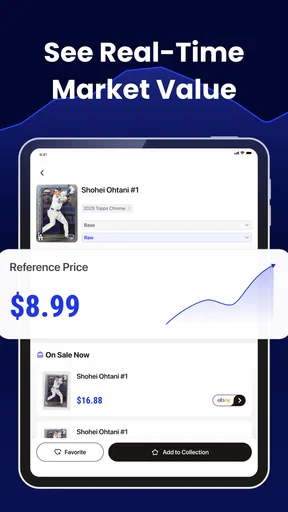
Valuation is where enthusiasm can easily outrun caution. A displayed estimate may help me decide which cards deserve research, but it should not be read as a promise of what a buyer will pay. The same card can have very different outcomes depending on condition, authenticity, edition, grading, demand, and the selling venue.
My preferred workflow would be to treat the app’s figure as a screening tool. If a card seems unremarkable, I can organize it and move on. If it appears valuable, I would verify the identification, inspect the physical card under good light, and compare the result with current market evidence before selling or paying for professional services. This is one of the most important trade-offs: convenience saves time, but careful verification protects against costly mistakes.
I would be particularly cautious with cards that look similar. A scanner may recognize the broad identity while missing a variation that matters to collectors. Parallel versions, special inserts, print differences, and condition-sensitive examples are exactly the cases where a quick result deserves a manual check. The app can narrow the search, but my eyes and additional research still have a role.
Where user agency is strongest
Spoly is most appealing when I remain in charge of the collection rather than allowing the app to define it automatically. I would use scans to create a first draft, then correct entries, group cards deliberately, and keep uncertain matches separate until I have checked them. That approach turns automation into assistance instead of surrendering control to it.
There is also a useful emotional benefit to this method. Collectors often remember the exciting cards and forget the ordinary ones. A structured catalog gives every card a place, which can reduce repeated scanning and unnecessary purchases. Before buying another card, I could check whether I already own it or whether a similar item is sitting in an unreviewed box. That makes the app useful not only for valuation but also for better collection decisions.
At the same time, I would not use it as my only record for particularly valuable items. I would keep a separate personal backup of important identifying details and storage locations, especially if the collection represents significant money or sentimental value. A digital manager is convenient, but relying on one app for every record creates avoidable risk if access, account settings, or device availability becomes a problem.
Who should use it, and who should choose another approach?
I think Spoly is a good fit for beginners who want a guided way to understand a sports card collection, casual collectors who need better organization, and experienced users who want to speed up the first pass through a large pile. Its value is clearest when the collection is active: cards are being acquired, sorted, compared, and revisited.
I would be more cautious about recommending it as the sole tool for professional buying, formal appraisal, or high-value transactions. Someone who needs documented provenance, detailed grading analysis, or a specialist marketplace workflow may be better served by dedicated collector resources and human expertise. The app can reduce the amount of manual searching, but it does not remove the need for professional judgment in high-stakes situations.
It may also be a poor match for someone who dislikes account-based services, does not want to review purchase screens, or only owns a handful of cards that are already well documented. In that case, a spreadsheet or simple notes app may offer enough control with less setup. Spoly earns its place when identification and cataloging are repeated often enough to justify a dedicated workflow.
My final view after weighing convenience against caution
Spoly: Sports Card Scanner has a clear practical purpose, and I like that it connects card recognition with valuation and collection organization instead of stopping at a single scan. The 10K+ installs show that it has begun attracting a real user base, while its strong average rating indicates a generally positive reception. Still, those signals should complement personal testing rather than replace it.
My recommendation is to start slowly: install it on a compatible device, scan a small group of ordinary cards, inspect the matches, review the available account and permission choices, and understand any paid screen before committing money. Then build the collection in organized batches and keep uncertain results separate. That approach lets me judge whether the app fits my habits without exposing the whole collection to rushed decisions.
The best way to use Spoly is as a careful first pass, not as the final authority on identity or value. For everyday collecting, that balance makes it a useful lifestyle app and a convenient place to begin. For expensive cards or formal selling decisions, I would pair it with close physical inspection, independent research, and specialist advice. Used with that level of caution, it can save time while leaving the important choices where they belong: with the collector.
Verdict
Strengths of Spoly: Sports Card Scanner
- Quickly identifies many sports cards using the phone camera.
- Useful for checking card details while sorting a collection.
- Supports multiple major sports and popular card categories.
- Helps estimate collection value without manual price searching.
- Clean interface makes scanning easy for beginners.
Limitations of Spoly: Sports Card Scanner
- Recognition accuracy can vary with glare, damage, or unusual card editions.
- Value estimates may differ from current market prices and completed sales.
- Some features or scans may require a subscription or in-app purchase.
- A large collection can take time to scan card by card.
- Results depend on an internet connection and available database records.
Similar Picks in This Category
View All
SmartThings
Samsung Electronics Co., Ltd.4.6

Google Home
Google LLC4.0

Pinterest4.2

Astrotalk - Talk to Astrologer
Astrology & Horoscope4.7

My Verizon
Verizon Consumer Group4.5

Samsung Wallet (Samsung Pay)
Samsung Electronics Co., Ltd.4.1
Frequently Asked Questions
What is Spoly: Sports Card Scanner used for?
Spoly: Sports Card Scanner is designed to help collectors identify and organize sports trading cards using a phone camera. After scanning a card, the app can provide information such as the player, set, year, and estimated market value when data is available. It is useful for quickly reviewing a collection, checking cards before selling or trading, and creating a more searchable digital inventory.
Which sports cards can Spoly scan?
The app is primarily intended for sports trading cards, but its accuracy may depend on the sport, card manufacturer, release year, language, and the quality of its database. Popular modern cards are generally easier to recognize than rare, vintage, custom, damaged, or poorly photographed cards. Before downloading, collectors should check the current supported sports and card categories because coverage can change with app updates.
Are the prices shown by Spoly accurate?
Spoly’s displayed values should be treated as estimates rather than guaranteed selling prices. Card prices can change rapidly according to player performance, condition, grading, scarcity, demand, and recent marketplace activity. A scan may identify the correct card but still show an incomplete or outdated value. For important purchases or sales, compare the result with recent completed listings and professional grading information.
Does Spoly require an account or subscription?
Some features may be available without payment, while advanced scanning, collection tools, price information, or usage limits may depend on an account or a premium subscription. The exact terms can vary by platform and app version, so review the in-app pricing page before starting a trial. Also check renewal details, cancellation rules, and whether subscriptions are managed through Google Play or the App Store.
How can I get the best scanning results with Spoly?
For more reliable recognition, place the card on a flat, uncluttered surface and use bright, even lighting without reflections. Keep the entire card inside the camera frame, hold the phone steady, and clean the lens before scanning. If the app fails to identify a card, try repositioning it, removing protective glare, or entering the card details manually when that option is available.
